
YubiOn for Salesforce
A multi-factor authentication (MFA) solution for Salesforce login.Minimize burden on admins and users while enabling MFA with YubiKey.
Who is this for
Challenges YubiOn for Salesforce solves
Does this sound familiar?
Salesforce is sending notifications to "enable MFA settings"
We want to comply with minimal effort and as little change to users as possible
As a Salesforce administrator, the details of MFA requirements are unclear
We want to manage who is logging in with which key
We must complete deployment to all users within a short timeframe
Supported Environments
Key Features
YubiOn for Salesforce features
Strengthen authentication with YubiKey (OTP)
Get started with multi-factor authentication (MFA) quickly via simple setup. Protect customer data assets with strong authentication.
Authenticator management
Manage authenticators directly — register, edit (rename), and delete YubiKeys as needed.
Authenticator assignment
Assign or unassign YubiKeys to users. Assigning a key enforces MFA for that user.
Multiple keys per user
Assign multiple YubiKeys to a single user. Ideal for keeping a backup key.
No authentication server required
Uses Yubico's YubiCloud as the authentication server, so there is nothing to build. Secret credentials are registered at manufacturing time, so purchased YubiKeys work immediately.
Effective when FIDO is unavailable
YubiKey OTP is recognized as keyboard input, making it ideal when FIDO cannot be used due to USB restrictions or remote connections. No PIN or authenticator-side configuration is required.
Compatible YubiKeys
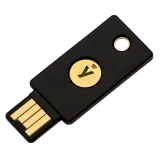
YubiKey 5 Series and later (models with Yubico OTP support)
※ The Security Key Series does not include Yubico OTP functionality and is not compatible. Please be aware of this when purchasing.
Pricing
YubiOn for Salesforce
| YubiOn for Salesforce | ||
|---|---|---|
| Trial | Paid License | Enterprise |
Free | ¥3,600 (per user / year) | Custom Quote (100+ users) |
About the Trial
- ・Available for 30 days after package installation.
- ・You will not be automatically charged after the trial period ends. Please apply for a paid license during the trial period.
Other Notes
- ・Sold in sets of 10 users per set.
- ・Contracts are annual. No refunds for cancellations during the contract period.
- ・YubiKey for MFA must be purchased separately.
- ・For organizations with 100 or more users, please contact us.
Specifications
System Requirements
| Item | Details |
|---|---|
| Authentication methods | Yubico OTP |
| MFA compliance | Fully satisfies Salesforce's mandatory MFA requirements |
| Supported YubiKey | YubiKey 5 Series (NFC/USB-A/USB-C variants) |
| Pricing | Monthly (tiered by Salesforce license count, quote required) |
Getting Started
Getting Started
- 1
Install the Package
Install "YubiOn for Salesforce" from AppExchange. Refer to the setup guide for configuration instructions.
[Important Notes]
- ・YubiOn for Salesforce is available as a free trial for 30 days after installation.
- ・To switch to a paid plan, please contact us via the application form during the trial period.
- ・If you do not wish to continue, please uninstall before the trial period ends.
- 2
Apply for a Paid License
Contact us via the application form during the trial period.
- 3
Submit a Purchase Order
We will prepare a quotation and purchase order based on your application. Please submit the completed purchase order.
- 4
Order Complete & License Activation
Once your order is confirmed, your license will be activated and you can start using the service.
Terms
YubiOn for Salesforce Terms and Conditions
Release Notes
Update History
FAQ
FAQ
Comply with Salesforce MFA mandate today
Same-day completion is possible. Contact us first.